Product knowledge training should prepare employees to make good decisions with customers, not just recite a feature list.
That is why product knowledge training games work best when they ask sales and support teams to match customer needs to the right solution, explain outcomes, handle common objections, troubleshoot realistic situations, and recognize when to escalate.
The 10 activities below can be used during onboarding, a product launch, a sales meeting, a support huddle, or a short refresher. Most can run in 5 to 15 minutes with questions built from approved product documentation, customer FAQs, release notes, and real scenarios from the field.
Why Product Knowledge Training Often Falls Short
Many product training programs focus on delivery instead of application. Employees watch a demonstration, read a feature summary, or attend a launch presentation, but they get few chances to use the information before a customer asks a difficult question.
That creates predictable gaps:
- Sales representatives know what a feature does but cannot connect it to a buyer's problem.
- Support agents remember the happy path but miss the first useful troubleshooting step.
- Teams repeat outdated messaging after a product or policy change.
- Employees guess when they should hand an issue to another team.
- Managers can see that training was completed but not which topics remain unclear.
Effective product training should connect features to outcomes, use real customer examples, prepare employees for objections and FAQs, and continue after the initial launch. Articulate's product training guidance emphasizes those same priorities, including ongoing reinforcement and easy-to-update content.
Games are useful because they create short cycles of recall, decision-making, feedback, and discussion. They do not replace product documentation, hands-on practice, call coaching, or a formal learning system. They add an active practice layer between "I saw the information" and "I can use it with a customer."
What Product Knowledge Should Employees Practice?
Before choosing a game, define the knowledge employees actually need for their roles.
| Knowledge Area | Sales Team Example | Support Team Example |
|---|---|---|
| Customer fit | Recognize a strong use case | Understand the customer's goal before troubleshooting |
| Features and limits | Explain what the product can and cannot do | Identify expected behavior versus a defect |
| Outcomes | Connect a feature to time saved or risk reduced | Explain how a workflow solves the customer's problem |
| Setup and workflow | Demonstrate the correct sequence | Guide the customer through the next useful step |
| Objections and FAQs | Use approved, accurate responses | Answer common questions without overpromising |
| Escalation | Know when to involve a specialist | Route billing, security, or technical issues correctly |
| Product changes | Use current positioning and release details | Recognize changes that affect troubleshooting steps |
Do not put every detail into one activity. Pick one business decision, build a short game around it, and use the results to choose the next topic.
1. Customer Problem-to-Product Match
Give participants a short customer situation and ask them to choose the best product, plan, feature, or next step.
Example:
A customer needs to train employees in several locations without installing software on company devices. Which capability should you explain first?
This game helps sales teams practice discovery and helps support teams avoid recommending a feature before they understand the problem.
How to run it
- Collect 8 to 10 common customer needs.
- Write one clear scenario for each need.
- Include plausible choices, not obviously wrong distractors.
- Explain why the best answer fits and why the alternatives do not.
- Flag scenarios where more discovery is needed before anyone should recommend a solution.
HubSpot's sales training guide includes a similar match-game approach: pair customer scenarios with the product or upgrade that best solves the problem.
2. Feature-to-Outcome Sprint
Feature memorization does not guarantee useful customer conversations. In this activity, participants translate a feature into the outcome it supports.
Prompt examples:
- What customer problem does this feature solve?
- Which role benefits most from it?
- What should you avoid promising?
- What question would you ask before recommending it?
- How would you explain it without using internal terminology?
For a live session, reveal one feature at a time and give teams 60 seconds to choose or write the strongest outcome statement. Then compare the answer with approved messaging.
The scoring should reward accuracy and relevance, not the most dramatic sales claim.
3. Objection Response Challenge
Build a game from the questions and objections employees hear most often.
Useful categories include:
- Pricing and packaging
- Setup time
- Security and privacy
- Integrations
- Product limitations
- Competitor comparisons
- Implementation support
- Contract or billing questions
Ask participants to choose the best approved response or the best next question. Sometimes the correct answer should be to pause, verify, or bring in another team.
Example:
A prospect asks whether the product supports a security requirement that is not covered in the approved documentation. What should the representative do next?
The best answer is not an improvised promise. It is the approved verification or escalation path.
4. Product Myth or Fact
Product myths spread quickly when release notes, internal messages, and customer conversations use different language.
Create a true-or-false activity from statements employees commonly misunderstand:
- "This feature is available on every plan."
- "Customers need to install an application before joining."
- "This workflow replaces the customer's existing recordkeeping system."
- "Only administrators can view this report."
- "This integration updates data in real time."
After each answer, show the current source of truth. A link to the relevant help article, release note, or policy is more useful than a simple "correct" message.
Review the activity after every significant product change so the game does not become another source of outdated information.
5. Demo Sequence Scramble
Sales and customer success teams often know individual features but struggle to present them in a logical order.
Give participants the steps of a common demonstration in the wrong order. Ask them to select what should happen first, next, and last based on the customer's goal.
For example:
- Confirm the customer's use case.
- Show the workflow that addresses that use case.
- Explain the result or report.
- Address a likely question.
- Agree on the next step.
Create different sequences for different buyer roles. A manager may care about reporting first, while a frontline user may care about how quickly they can start.
This activity should reinforce a customer-centered story, not one rigid script for every conversation.
6. FAQ Lightning Round
Turn the most common customer questions into a fast, low-pressure review.
Use 8 to 12 questions that employees should be able to answer accurately without searching. Mix direct recall with application:
- Where can a customer find a specific setting?
- Which plan includes a particular capability?
- What is the first troubleshooting step for a common issue?
- Which answer is accurate but uses language a customer can understand?
- When should the employee consult documentation instead of answering from memory?
Run the same core questions again after one week, then replace items the team consistently answers correctly. This turns the game into a lightweight reinforcement routine instead of a one-time event.
7. Support Triage Simulation
Support teams need to identify the right next action under pressure. A triage game gives them safe practice before the situation appears in a live queue.
Build scenarios around:
- Missing information
- Account access
- Billing questions
- Suspected defects
- Known limitations
- Security or privacy concerns
- Feature requests
- Urgent customer-impacting issues
For each scenario, ask participants to choose:
- The first clarifying question
- The correct troubleshooting step
- The right internal owner
- The appropriate priority
- The information that belongs in the handoff
Use approved support procedures as the answer key. Avoid creating hypothetical processes that do not match the real queue, service level, or escalation policy.
8. Release Notes Challenge
Product updates create a training problem: experienced employees may keep using old explanations because they feel familiar.
After a release, build a short challenge that asks:
- What changed?
- Who is affected?
- What stayed the same?
- What should sales or support say differently?
- Which help article or internal resource was updated?
- Does the change affect an existing demo or troubleshooting step?
Keep the activity focused on decisions employees will make, not every technical detail in the release notes.
A five-question game in a team meeting can reveal whether the update is clear before inconsistent information reaches customers.
9. Cross-Functional Handoff Game
Customers experience one company, even when sales, support, implementation, billing, and product teams have separate responsibilities.
Create scenarios that test whether employees know where an issue belongs and what context the next team needs.
Example:
A customer asks support to change a contract term while reporting a technical issue. What should the agent handle, what should be routed, and what information should be included in each handoff?
Good answers should reflect the real ownership model. The goal is not to pass work away quickly. It is to give the customer a clear next step and prevent them from repeating the same story.
This game is especially useful after reorganizations, new product launches, or changes to escalation paths.
10. Product Knowledge Championship
A longer team competition can work well for a sales kickoff, support summit, or product launch, but only if the questions reflect real work.
Use rounds such as:
- Customer fit
- Feature-to-outcome matching
- Objections and FAQs
- Troubleshooting
- Product updates
- Escalation decisions
Mix individual questions with team discussion. Keep sensitive performance topics out of public leaderboards, and avoid using the game as the only measure of job readiness.
The most valuable result is not the winning score. It is the list of questions many people missed, because that list tells managers what to clarify next.
How to Choose the Right Product Knowledge Game
| Training Goal | Best Activity | Recommended Length |
|---|---|---|
| Improve discovery and product fit | Customer Problem-to-Product Match | 10 minutes |
| Strengthen value messaging | Feature-to-Outcome Sprint | 10 to 15 minutes |
| Prepare for difficult conversations | Objection Response Challenge | 15 minutes |
| Correct common misunderstandings | Product Myth or Fact | 5 to 10 minutes |
| Improve demonstrations | Demo Sequence Scramble | 10 minutes |
| Reinforce common answers | FAQ Lightning Round | 5 minutes |
| Improve support decisions | Support Triage Simulation | 10 to 15 minutes |
| Prepare teams for a launch | Release Notes Challenge | 5 to 10 minutes |
| Clarify ownership | Cross-Functional Handoff Game | 10 minutes |
| Review several skills together | Product Knowledge Championship | 20 to 30 minutes |
Choose the smallest activity that addresses the current gap. A five-minute release check may be more useful than a 30-minute competition if the only goal is to clarify one new workflow.
Build Better Product Knowledge Questions
Start with approved sources:
- Product documentation
- Release notes
- Pricing and packaging guidance
- Sales playbooks and battlecards
- Support macros and escalation procedures
- Customer FAQs
- Anonymized questions from sales calls or support tickets
- Approved security, legal, and compliance language
Then write questions that test decisions, not trivia.
Weak question:
What year did the company launch Feature X?
Stronger question:
A customer needs to solve Problem Y. When is Feature X a good fit, and what should you confirm before recommending it?
Use realistic wrong answers based on common misconceptions. Add a short explanation for every answer so the activity teaches while it checks understanding.
If AI helps create a first draft, review every question against the current source material before employees play. Product details, pricing, limits, and escalation rules can change.
A Simple 30-Day Product Training Plan
| Timing | Activity | Purpose |
|---|---|---|
| Day 1 | Customer Problem-to-Product Match | Establish the core use cases |
| Day 3 | Feature-to-Outcome Sprint | Practice customer-centered explanations |
| Week 2 | Objection or Support Triage Challenge | Apply knowledge in realistic situations |
| Week 3 | FAQ Lightning Round | Reinforce the most-used information |
| Day 30 | Mixed Product Knowledge Game | Check retention and identify the next coaching topics |
Spacing activities across several weeks gives employees repeated chances to retrieve and apply information. The Learning Scientists' guides to retrieval practice and spaced practice explain why recalling information and revisiting it over time are more useful than relying only on repeated exposure.
For a broader reinforcement framework, read How to Improve Knowledge Retention After Employee Training.
Measure What the Team Needs Next
Do not stop at completion or the total score. Review:
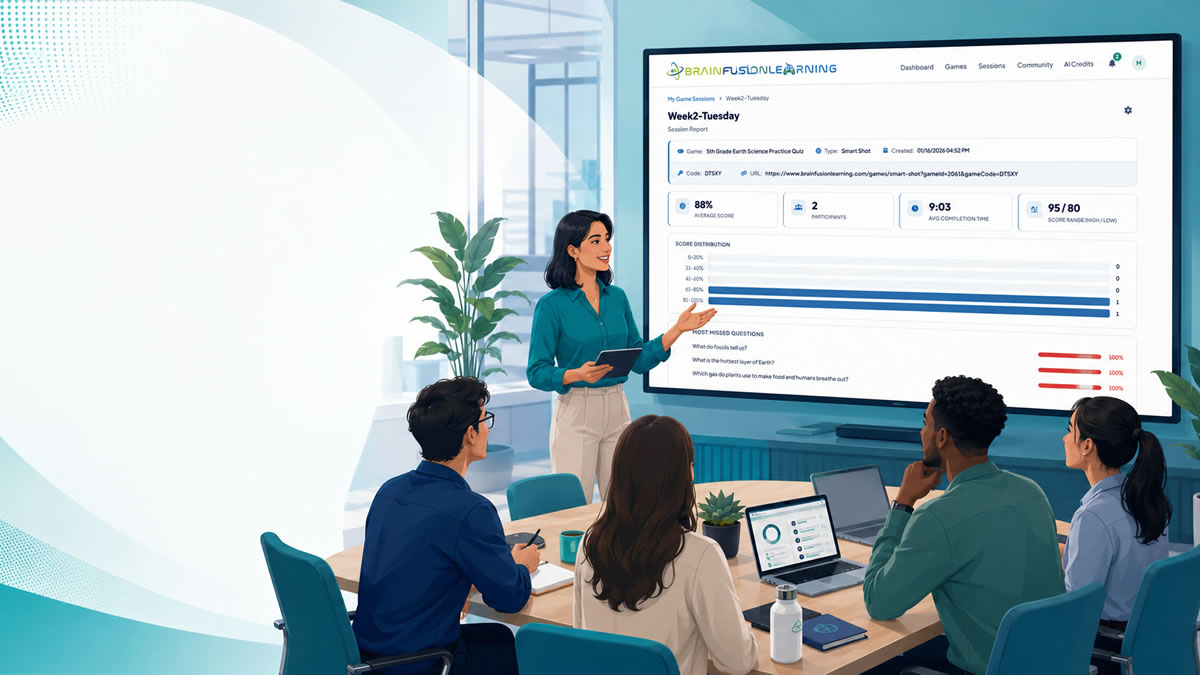
- The questions most people missed
- Wrong answers that attracted many participants
- Differences between roles, teams, or locations
- Topics employees answered correctly but could not explain
- Questions that were ambiguous or based on outdated material
- Issues that need documentation, coaching, or product clarification
Use the results to choose the next action. A confusing pricing question may need a revised battlecard. A missed support scenario may need a workflow demonstration. A product limitation employees keep misunderstanding may need clearer internal documentation.
Avoid claiming that a game caused sales or support outcomes on its own. If you track business measures such as time to productivity, escalation quality, first-contact resolution, or product-specific win rates, look for patterns over time and consider the other factors that influence performance.
Where BrainFusion Fits
BrainFusion helps sales enablement, customer support, HR, and L&D teams turn product content into short, browser-based learning games.
Teams can:
- Generate draft questions from a prompt or existing text
- Import an approved question bank from CSV
- Edit questions and feedback before the session
- Run live activities with simple join codes and no installation
- Reuse one question set across multiple game formats
- Review session summaries and question-level results
This makes BrainFusion useful for product onboarding, release refreshers, sales meetings, support huddles, and cross-functional training.
It is not a replacement for your LMS, sales enablement platform, support knowledge base, call coaching, or official product documentation. Use it as an active practice and reinforcement layer that helps teams apply accurate product knowledge.
For related onboarding ideas, read Gamified Onboarding Activities for New Employees.
Common Mistakes to Avoid
- Testing obscure facts instead of customer decisions
- Rewarding confident guesses when the right action is to verify
- Using outdated pricing, feature, or escalation information
- Training every role with the same scenarios
- Turning sensitive performance gaps into a public competition
- Letting AI-generated questions bypass product-owner review
- Measuring only the final score
- Running one launch game with no later reinforcement
- Ignoring the questions employees miss most often
The best product knowledge training games are accurate, role-specific, easy to update, and connected to real customer situations.
Final Takeaway
Product knowledge becomes useful when employees can apply it.
Start with one recurring customer situation, create 8 to 10 decision-focused questions, run a short activity, and review the most-missed items. Then revisit those decisions after employees have had time to use the knowledge in real conversations.
That simple loop can help sales and support teams move beyond feature memorization toward clearer explanations, better questions, and more consistent customer decisions.
For more workplace learning ideas, explore the corporate training games topic guide.
Turn product content into a team knowledge game
Create a browser-based activity from product documentation, FAQs, release notes, or approved sales and support material, then review what your team understood.